How to promote a YouTube video: a launch plan
On this page
In short
To promote a YouTube video, get the title and thumbnail right before upload, share it where your audience already is, cut a Short that points to it, link it from your older videos and playlists, and reply to comments. If the video holds viewers, YouTube Promote in Studio can put paid views behind it.
Key takeaways
- Promotion starts before you upload: the title and thumbnail decide who clicks.
- YouTube's own Help Center recommends cross-promoting, talking to viewers, playlists and captions.
- Shorts can be up to three minutes long since October 2024, so a Short can carry a real teaser for the full video.
- YouTube Promote runs paid campaigns from YouTube Studio through Google Ads, for public or unlisted videos of at least 10 seconds that pass a policy review.
- Judge promotion by impressions click-through rate, average view duration and traffic sources, not by views alone.
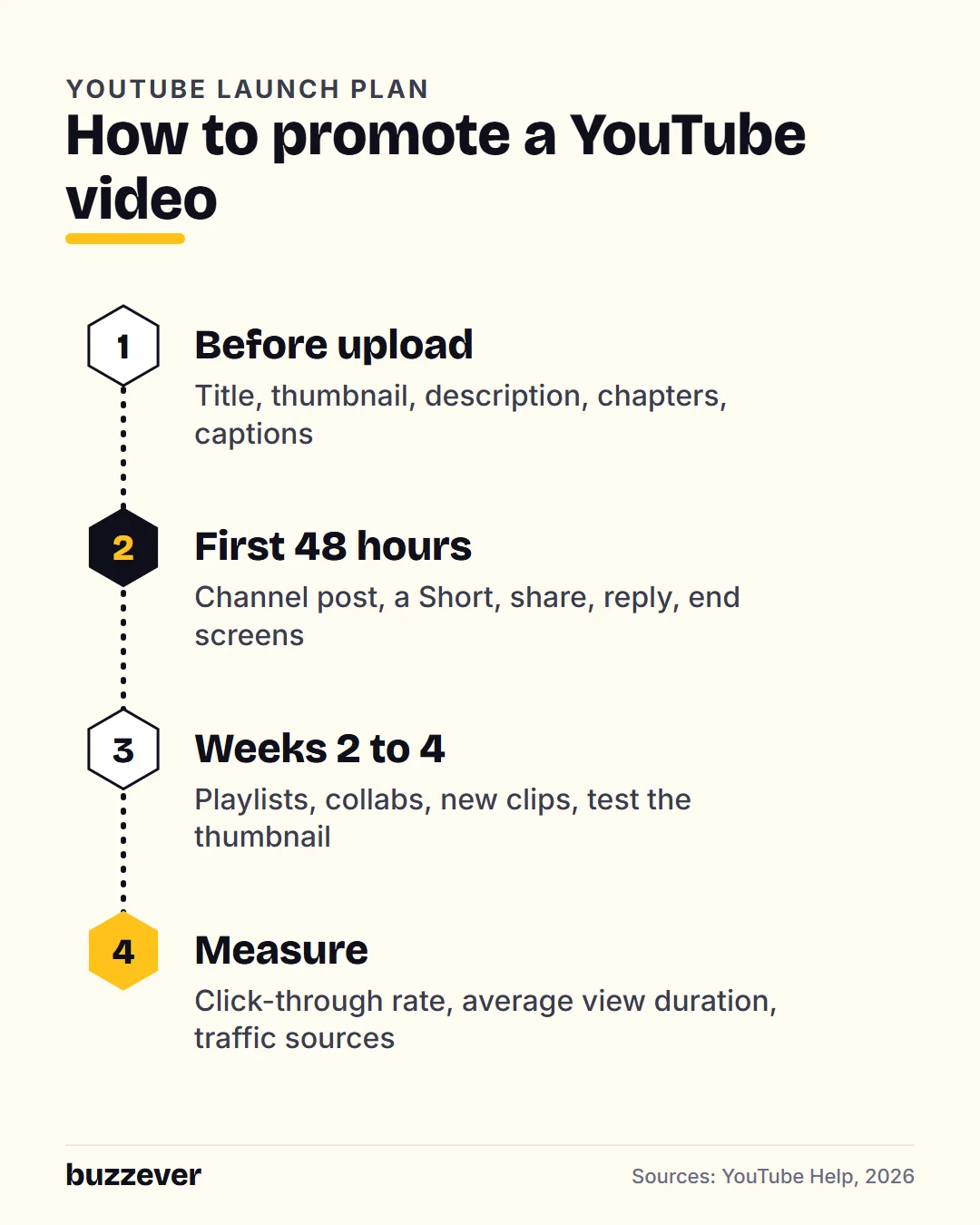
Most guides on how to promote a YouTube video are really about growing a whole channel. This one is about a single video: the one you're about to publish, or the good one that went quiet. It's laid out as a launch plan in three stages, before upload, the first 48 hours, and the weeks after, followed by the paid option and the numbers that tell you whether any of it worked.
Every YouTube rule mentioned here links to YouTube's own help pages, so you can check the details yourself. None of it guarantees views. What it does is make sure the people most likely to enjoy the video get a fair chance to see it.
Before you upload: make the video worth promoting
Promotion multiplies what's already there. If the title is vague or the thumbnail is hard to read on a phone, every share and every ad has to work twice as hard. Fix these first.
Title
Use the words people would actually type, and put the most important ones first, because long titles get cut off in search and suggestions. Promise one clear thing and make sure the video delivers it.
Thumbnail
One idea, readable at the size of a fingernail. A face showing a clear reaction, a big result, or three or four words of text tend to work better than a busy scene. YouTube's Help Center suggests "eye-catching titles" as part of promotion, and the thumbnail is the other half of that first impression.
Description, chapters and tags
Put the main point and your keywords in the first two lines of the description, since that's the part people see. Add chapters with timestamps so viewers can jump to the part they came for. For product reviews, YouTube's Help Center suggests adding identifiers such as the brand, model number or ISBN as tags.
Captions and translations
YouTube recommends automatic captions plus manual translations, or third-party tools, to reach viewers in other languages. Check the automatic captions before you publish, and fix names and key terms.
The first 48 hours
The first two days are when your existing audience decides whether the video is worth their time. Work through these in order:
- Tell your subscribers directly. Write a post on your channel about the video, with a question that makes people want to watch.
- Cut a Short from it. YouTube has allowed Shorts up to 3 minutes long since October 15, 2024, which is enough for a proper teaser. End it by telling people where the full video is.
- Share where your audience already is. YouTube's advice is to "link your YouTube channel in as many places as you can". Post it on your other social accounts, in your newsletter and on your website, and allow embedding so others can share it.
- Answer real questions with it. If people in a forum or group are asking exactly what your video explains, a short answer with the link helps them. Read each community's rules first, and don't drop links where they aren't wanted.
- Reply to the first comments. Pin a comment that adds something, and answer early commenters. YouTube's Help Center suggests asking viewers to subscribe and keeping comments turned on.
- Point your older videos at it. Add the new video to the end screens and cards of your most-watched older videos, so their viewers find it.
Weeks 2 to 4: keep it in front of viewers
A video doesn't stop working after launch week. Keep it moving:
- Playlists. YouTube suggests grouping videos into playlists by theme. Add the video to one that people already watch, so it plays next.
- Collaborations. Work with a creator in your niche on a related video, with each of you linking to the other.
- Re-cut the best moment. If one section gets rewatched, turn it into a second Short or a clip for your other platforms.
- Refresh the packaging. If people who click watch for a long time but few people click, test a new thumbnail or title. If lots click but leave early, the opening needs work, and no amount of promotion fixes that.
Paid promotion with YouTube Promote
When a video is holding viewers and you want more people to see it, YouTube has a built-in paid option. According to YouTube's Help Center, Promote lets you grow subscribers, boost views or increase clicks to your website, with targeting by location, language and interests. You can start it from a video's three-dot menu, from the Promote button on the watch page, or from the Promotions tab under Content in YouTube Studio.
The setup steps on YouTube's promotions page are short: pick a goal, choose who to reach, then set a budget and an end date, with billing through a Google Ads account. To be eligible, a video must:
- be public or unlisted,
- be at least 10 seconds long,
- follow Google's advertising policies, because promotions go through a policy review.
Paid promotion works best on a video that already does well with the people who find it. If viewers leave in the first 30 seconds, paying for more of them only buys more early exits.
How to tell if promotion worked
Views alone don't tell you much. Open the video's analytics in YouTube Studio and compare the week before and after each push.
| Number | What it tells you |
|---|---|
| Impressions click-through rate | How often people who saw the thumbnail clicked it: a test of title and thumbnail |
| Average view duration | How long viewers stayed: a test of the opening and pacing |
| Traffic sources | Where viewers came from, such as search, suggested videos, external sites or YouTube advertising, so you can see which push worked |
YouTube's own impressions and click-through rate FAQ adds a fair warning: its benchmarks come from averages across YouTube and don't guarantee any outcome for a single video. Compare a video with your own past videos, not with someone else's channel.
Read next: How to start a YouTube channel: a 6-step setup and YouTube monetization requirements in 2026: both levels explained.
Keep growing
Use this plan on your next upload, then check the three numbers a week later. One launch you can measure teaches you more than ten you can't. For more on the platform, see Buzzever's YouTube page.
Questions readers ask
How can I promote my YouTube video for free?
Share it with your subscribers in a channel post, cut a Short that points to it, post it on your other social accounts and newsletter, add it to a playlist, and link it from the end screens of your popular older videos. Reply to early comments too.
Is it worth promoting a YouTube video with ads?
It can be, once the video already keeps viewers watching. YouTube Promote lets you choose a goal, an audience, a budget and an end date. If people leave early, fix the video first, because paid views won't change that.
How much does it cost to promote a video on YouTube?
You decide. When you set up YouTube Promote you choose your own budget and end date, and billing runs through Google Ads. Videos also need to pass a policy review before the promotion runs.
How do I get my first 1,000 subscribers on YouTube?
Publish on a steady schedule, group videos into playlists, use Shorts to point to longer videos and ask viewers to subscribe, as YouTube's Help Center suggests. 1,000 subscribers is also the first requirement for the YouTube Partner Program.
How many views do you need to make money on YouTube?
YouTube doesn't set a view count. To join the YouTube Partner Program you need 1,000 subscribers plus either 4,000 qualified watch hours in the last 12 months or 10 million qualified Shorts views in the last 90 days, according to YouTube's eligibility page.