YouTube monetization requirements in 2026: both levels explained
On this page
In short
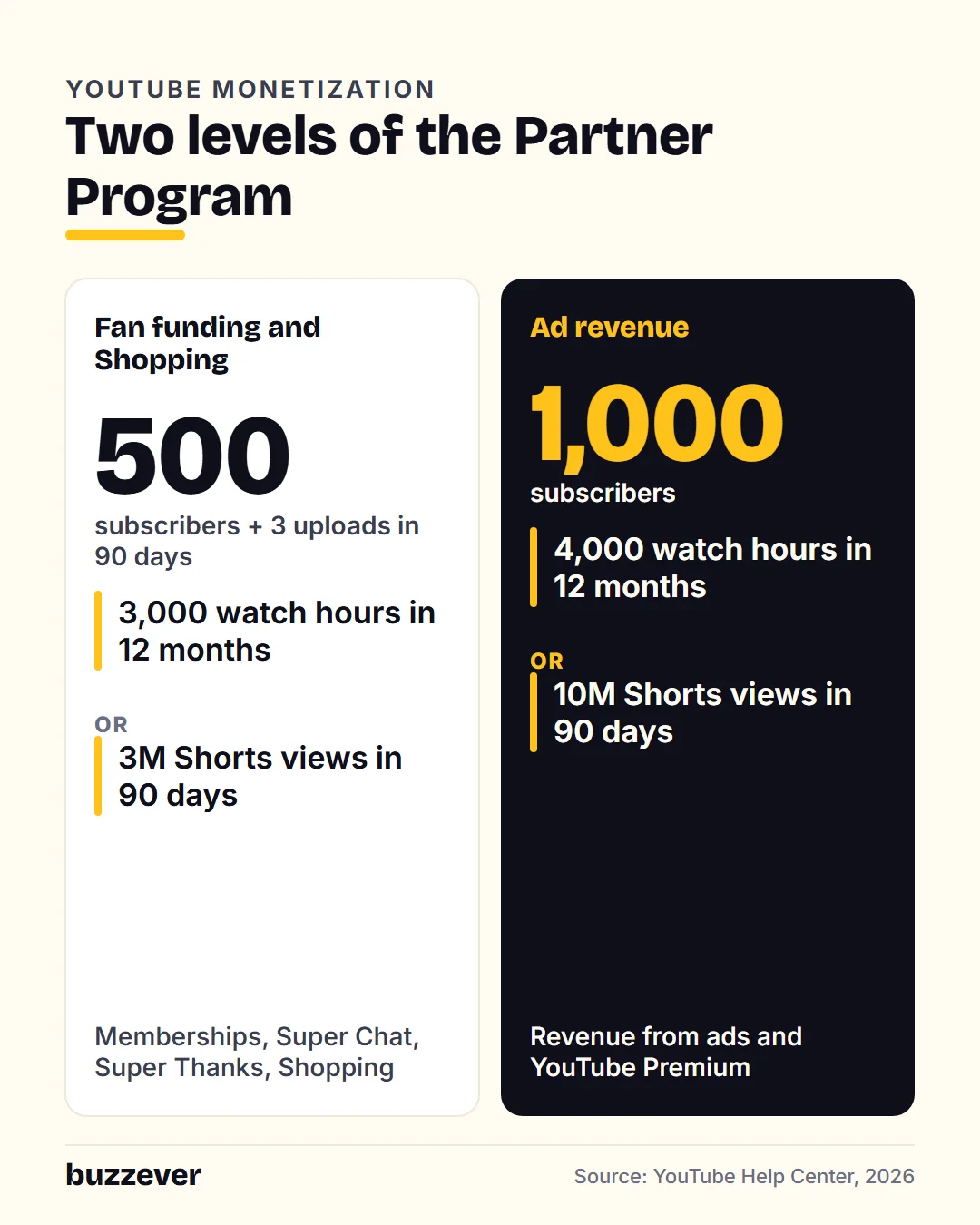
To monetize on YouTube you join the YouTube Partner Program. With 500 subscribers, 3 uploads in 90 days and 3,000 watch hours or 3 million Shorts views, you get fan funding and Shopping. Ad revenue needs 1,000 subscribers with 4,000 watch hours in 12 months or 10 million Shorts views in 90 days.
Key takeaways
- There are two levels. With 500 subscribers, 3 uploads in 90 days and either 3,000 watch hours or 3 million Shorts views, you can join the expanded YouTube Partner Program for fan funding and Shopping.
- Ad revenue starts at 1,000 subscribers with either 4,000 qualified watch hours in 12 months or 10 million qualified Shorts views in 90 days.
- You also need 2-Step Verification, one AdSense for YouTube account, no active Community Guidelines strikes and a channel in an eligible country.
- Hitting the numbers isn't enough. Reviewers check that your channel is original and follows the monetization policies, and fake views or subscribers can cost you the channel.
- YouTube says updated Partner Program terms start on 1 February 2027; accept them in YouTube Studio by 31 January 2027 to keep full monetization.
The YouTube monetization requirements are simpler than the forums make them sound, but they come in two levels, and most guides blur them together. This one sets them side by side, straight from YouTube's own Help Center and creator pages, checked in October 2026. You'll also find the checklist of account settings you need, what reviewers look at, and what to do if your first application is turned down.
The two levels of the YouTube Partner Program
YouTube has expanded the Partner Program so creators can join earlier for fan funding and Shopping, then add ad revenue at the higher threshold. The expanded program covers many countries, including the US, the UK, France, Germany, Spain, Italy, the Netherlands and Portugal.
| Fan funding and Shopping | Ad revenue and YouTube Premium revenue | |
|---|---|---|
| Subscribers | 500 | 1,000 |
| Uploads | 3 valid public uploads in the last 90 days | Not listed as a separate threshold |
| Long-form route | 3,000 qualified public watch hours in the last 12 months | 4,000 qualified public watch hours in the last 12 months |
| Shorts route | 3 million qualified Shorts views in the last 90 days | 10 million qualified public Shorts views in the last 90 days |
One detail catches people out: on the YPP eligibility page, YouTube says watch hours from Shorts views in the Shorts feed don't count toward the 4,000 watch hours. Pick the route that matches what you actually make.
What you can earn at 500 subscribers
Once accepted at the first level and after accepting the Commerce Products Module, you can use features such as channel memberships, Super Chat and Super Stickers, Super Thanks, Jewels and gifts in live streams, and Shopping, each with its own eligibility rules.
What changes at 1,000 subscribers
At the higher threshold you can share revenue from ads on your videos and from YouTube Premium subscribers who watch your content.
The account checklist
Before you apply, YouTube's Partner Program eligibility page says you need to:
- Follow the YouTube channel monetization policies.
- Live in a country or region where the program is available.
- Have no active Community Guidelines strikes.
- Turn on 2-Step Verification for your Google Account.
- Have advanced features access on YouTube.
- Have one active AdSense for YouTube account linked to the channel, or set one up in YouTube Studio when you apply.
YouTube asks you to create a new AdSense for YouTube account only inside YouTube Studio, not elsewhere.
How to apply
- Sign in to YouTube and open YouTube Studio.
- Click Earn in the left menu. If you're not eligible yet, select Get notified and YouTube will email you when you are.
- Select Apply now, then review and accept the base terms.
- Set up an AdSense for YouTube account, or link an existing active one.
- Wait for the review. YouTube says a decision typically takes about a month, and longer when application volumes are high.
What reviewers check
Meeting the numbers puts you in the queue. Automated systems and human reviewers then look at your channel as a whole. The channel monetization policies say monetizing content should be your original creation, and if you use someone else's material you need to change it significantly. It shouldn't be mass-produced, generic, repetitive or made only to get views. In July 2025 YouTube renamed its "repetitious content" policy to "inauthentic content" to make that clearer. Reviewers may focus on things like your titles, thumbnails and descriptions.
Fake engagement
YouTube's fake engagement policy doesn't allow anything that artificially increases views, likes, comments or other metrics, and it applies even when someone you hired did it. Content that breaks the policy can be removed, and channels can be terminated.
If you're rejected
YouTube says you can appeal the decision within 21 days, or keep uploading original content and apply again after 30 days. If it isn't your first rejection, the wait is 90 days. A rejection usually means reviewers found that a significant part of the channel doesn't follow the policies, so review your older uploads as well as your newest ones before you reapply.
Staying monetized
- Stay active. YouTube may turn off monetization on channels that haven't uploaded a video or posted to the Posts tab for 6 months or more.
- Accept new terms. YouTube says it's introducing Partner Program updates from 1 February 2027. To keep fully monetizing, review and accept the updated terms in YouTube Studio by 31 January 2027.
- Keep checking. YouTube continues to review channels in the program, so the policies apply after you're accepted too.
Wondering what the numbers could be worth once you're in? Our YouTube money calculator gives a rough range from your views. Treat it as an estimate: real earnings depend on your audience, topic and ad demand.
Read next: How to start a YouTube channel: a 6-step setup and How to promote a YouTube video: a launch plan.
Next step
Open the Earn tab in YouTube Studio and turn on Get notified, so YouTube tells you the moment you qualify. Then focus on original uploads people want to watch to the end. For more on growing a channel, see Buzzever's YouTube page.
Questions readers ask
How many subscribers do you need to get paid on YouTube?
500 subscribers to join the expanded YouTube Partner Program for fan funding and Shopping, with 3 public uploads in 90 days and either 3,000 watch hours or 3 million Shorts views. Ad revenue needs 1,000 subscribers with 4,000 watch hours or 10 million Shorts views.
Can I get monetized with 500 subscribers?
Yes, for fan funding and Shopping features such as memberships, Super Chat, Super Thanks and Shopping, if your channel is in an eligible country and meets the other thresholds. Sharing ad revenue needs 1,000 subscribers.
Do Shorts watch hours count toward 4,000 hours?
No. YouTube says watch hours from Shorts views in the Shorts feed don't count toward the 4,000 public watch hours. Shorts creators can use the separate route of 10 million qualified Shorts views in 90 days.
How long does YouTube take to review a monetization application?
Typically about a month, according to YouTube. It can take longer when application volumes are high or when a channel needs more than one review.
What are the YouTube Partner Program changes in 2027?
YouTube's Help Center says it's introducing updates to the Partner Program from 1 February 2027, and creators should review and accept the updated terms in YouTube Studio by 31 January 2027 to keep fully monetizing. Check YouTube Studio for the details that apply to you.