Can you see who clicked on your Instagram link?
On this page
In short
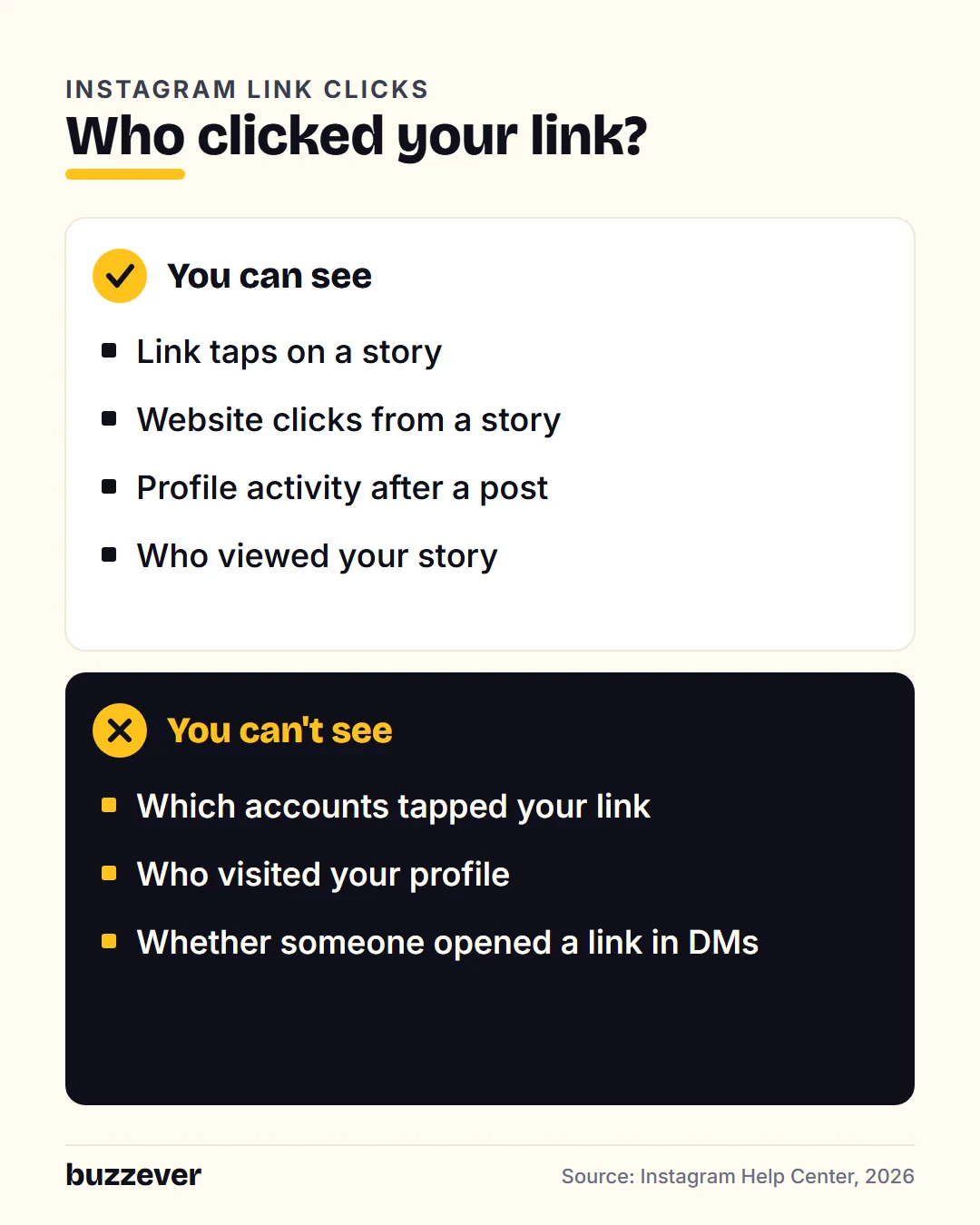
No. Instagram doesn't show which accounts tapped the link in your bio or story. On a public account, insights count story link taps and website clicks, and post insights count profile activity. To see what visitors do next, add UTM tags to your links and read them in your website analytics.
Key takeaways
- No. Instagram doesn't show you which accounts tapped the link in your bio or in a story. It shows counts, not names.
- Story insights count link taps and website clicks, and post insights count what people did on your profile after seeing a post, as long as your account is public.
- To see where clicks land on your own site, add UTM tags to the link and read them in your analytics.
- Tools that promise to reveal exactly who clicked can't get that data from Instagram, so be careful what you connect to your account.
Short answer: you can't see who clicked on your Instagram link. Instagram's insights tell you how many taps a link got, but not which accounts made them. That's true for the links on your profile and for the link sticker in your stories. What you can do is measure clicks properly, so you know which posts and stories send people to your site and what they do once they arrive.
This guide covers what Instagram shows, where to find it, how to tag a link so your own analytics picks it up, and the question people ask the other way round: can someone tell that you opened their link? Every Instagram detail below comes from its Help Center, checked in October 2026.
What Instagram shows you about link clicks
| Where the link is | What you can see | What you can't see |
|---|---|---|
| Profile links (up to 5) | Profile activity in post and story insights: actions people took on your profile, with website clicks listed for stories | Who tapped them |
| Link sticker in a story | Link taps counted in the story's interactions, plus the list of viewers | Which of those viewers tapped |
| Links in DMs | Nothing on Instagram's side | Whether or when the link was opened |
The story case catches people out. You can see the usernames of everyone who viewed your story, and you can see how many link taps it got, but Instagram doesn't connect the two. If 40 people viewed it and 6 tapped, you won't know which 6.
Where to find link taps and website clicks
You need a public account to see insights, either personal or professional. Insights cover any period in the past 90 days, and story insights stay available for up to two years after a story is posted.
For a story
- Open the story from your profile, or find a past one in insights under top content.
- Tap the options menu and choose View insights.
- Look at Interactions, which includes link taps and sticker taps, and Profile activity, which includes profile visits, follows and website clicks.
For a post
- Go to your profile and tap the post.
- Tap View insights.
- Check Profile activity, which Instagram defines as the actions people take when they visit your profile after engaging with your post. Post insights stay available for up to two years.
For the bigger picture, your dashboard (Professional dashboard on a professional account, Your dashboard on a personal one) shows views, interactions and new followers for the period you choose.
Instagram notes that some insights metrics are estimated and still in development, so treat small changes with caution and look at trends over a few weeks.
How to track clicks on your own site
Instagram's counts tell you how many people tapped. Your website analytics can tell you what they did next, if the link is tagged. Google Analytics, for example, reads UTM parameters added to a link and shows them in its traffic acquisition report. Google recommends always using these three:
- utm_source, such as instagram
- utm_medium, such as social
- utm_campaign, such as spring-menu
So a link might look like https://yoursite.com/menu?utm_source=instagram&utm_medium=social&utm_campaign=spring-menu. Use a different campaign value for your bio link and for each story link, and you'll see which one sends more visitors. Google also advises sticking to lowercase, because its reports treat "Instagram" and "instagram" as two different sources.
If you use a link-in-bio page with its own stats, the same rule applies: it can count taps on each button, but it gets those counts from its own page, not from Instagram.
Can someone see that you clicked their link?
Instagram's Help Center doesn't describe any feature that tells a profile owner which accounts tapped their link. They see totals in insights, like you do. The website you land on is a different matter: like any site, it can record that a visit happened, and if you sign in or fill in a form there, it knows more. That's about the website, not Instagram.
Viewing a story is different. If you watch someone's story, they can tell you've seen it, whether or not you tap the link.
Be careful with "see who clicked" apps
Some apps and websites promise to show exactly who clicked your link or who viewed your profile. Instagram doesn't provide that information, so these tools can't get it from Instagram. At best they show the same counts with a new design. At worst they ask for your password, which you should never hand over to a third party. Stick to Instagram's own insights and your website analytics.
Get more people to click
- Say why. "New recipe in the link" works better than "link in bio".
- One main link. Put the link that matters most at the top of your five.
- Use the sticker where people already are. A story with a clear reason to tap usually beats a bio link people have to go and find.
- Check the landing page on a phone. Most taps come from mobile, so a slow or fiddly page loses them.
To see how your posts perform overall, not just the links, our engagement rate calculator turns your likes, comments and followers into one comparable number.
Read next: How to grow your Instagram in 2026: a 7-step plan and Instagram bio ideas: a simple formula and 18 patterns to adapt.
Measure what matters
You won't get names, and you don't need them. Tag your links, check story taps and website clicks once a week, and keep the stories and posts that send people to your site. More Instagram guides are on Buzzever's Instagram page.
Questions readers ask
Can you see who clicked the link in your Instagram bio?
No. Instagram counts actions on your profile, including website clicks from stories, in its insights, but it doesn't show which accounts made them. You need a public account to see insights.
Does Instagram tell people when you click a link in their bio?
Instagram's Help Center doesn't describe any feature that names the people who tapped a link. Owners see totals in insights. The website itself may record visits like any site does.
Can I see who tapped the link sticker in my story?
No. You can see who viewed the story and how many link taps it got, but Instagram doesn't show which viewers tapped the link.
Can I find out who visited my Instagram profile?
Instagram doesn't show a list of profile visitors. Insights on a public account show how many accounts you reached and engaged, not their names. Be wary of apps that claim otherwise.
How long does Instagram keep link click data?
Account and content insights cover any period within the past 90 days. Story insights stay available for up to two years after the story is posted, even though the story itself expires after 24 hours.