How to get verified on Instagram: both routes explained
On this page
In short
There are two ways. Notable public figures, celebrities and brands can apply for the badge for free and hear back within 30 days. Anyone eligible can subscribe to Meta Verified, a paid subscription with an ID check; the price is shown in the app.
Key takeaways
- There are two ways to get the blue badge: apply as a notable public figure, celebrity or brand, or subscribe to Meta Verified.
- The notability route is free but strict. Instagram looks for an account that's authentic, unique, complete and notable, and it doesn't count paid or sponsored press.
- Meta Verified is a paid subscription with ID checks. The price is shown in the app before you pay.
- Either way, the badge confirms identity. Instagram says it isn't a sign of importance or expertise.
How to get verified on Instagram comes down to one choice. You either prove you're notable and apply for free, or you pay for Meta Verified and prove you're you. Instagram's Help Center puts it simply: there are two ways to get the verified badge. This guide walks through both, with the exact requirements and steps from Instagram's own pages, checked in October 2026.
One thing first, because it saves a lot of disappointment. Instagram describes the badge as a tool to help people find the real account of a person or brand. It says the badge is not a symbol of importance, authority or subject matter expertise. So think of it as an ID card, not a trophy.
Route 1: the notability badge (free)
This is the classic blue badge for public figures, celebrities and brands. Instagram reviews each request by hand against four criteria, and you also have to follow the Terms of Use and Community Standards.
The four requirements
According to Instagram's requirements page, your account needs to be:
- Authentic. It represents a real person, registered business or entity.
- Unique. It's the one presence of that person or business. Only one account per person or business can be verified, with exceptions for language-specific accounts. General interest accounts, like meme pages, don't qualify.
- Complete. The account is public, has a bio and a profile photo, and is active when you apply.
- Notable. It represents a well-known, highly searched person, brand or entity. Instagram reviews accounts featured in multiple news sources and doesn't consider paid or sponsored media.
Notice what's missing. Instagram publishes no follower minimum. A big following doesn't replace press coverage, and paying for articles about yourself won't count. If your bio is thin, fix that before you apply; our free Instagram bio generator can give you a few drafts to start from.
How to request the badge
You can only request it in the Android or iPhone app, not on a computer. Instagram's request page lists these steps:
- Log in to the account you want verified and go to your profile.
- Tap the menu in the top right.
- Under Your insights and tools, tap Professional dashboard, then Settings in the top right.
- Tap Request verification.
- Enter your full name and upload the required identification, such as a government-issued photo ID or official business documents.
- Follow the on-screen instructions and tap Submit.
What happens next
Instagram says you'll get a decision in Activity up to 30 days after applying. If the answer is no, you can apply again after 30 days. Don't send several requests while you wait. Applying more than once before a decision cancels your application.
If you're approved, a few rules kick in. You can't change your username, and the verification can't be moved to another account. Verifying on Instagram doesn't verify your Facebook profile either.
Route 2: Meta Verified (paid subscription)
Meta Verified for creators is a paid subscription that includes the verified badge, impersonation protection and enhanced support, along with other features. It renews automatically until you cancel. Meta lists several plans, and it says plans, benefits and availability vary by region, app and account. The price for your account is shown in the app when you start the subscription. Businesses have their own Meta Verified for businesses help centre.
Who can subscribe
Instagram personal profiles and Instagram professional creator profiles are eligible, as are the matching Facebook profiles. You can verify up to two profiles in the same Meta Account, one on Instagram and one on Facebook, and bundling two can lower the price.
How to subscribe
- Go to your profile and tap the menu in the top right, then tap Meta Verified.
- Choose the profile and plan, then pay. On iPhone, payment goes through the Apple App Store.
- Turn on two-factor authentication when asked.
- Confirm your profile details and upload photos of a government-issued photo ID.
The subscription guide adds some details worth knowing. Advanced Protection has to be on, and you can't switch it off while the subscription is active. Review can take up to 3 business days. If you don't finish verification within 3 days, the subscription is cancelled and you're eligible for a refund. While the application is in review, you may not be able to change your name, username, category, location or date of birth.
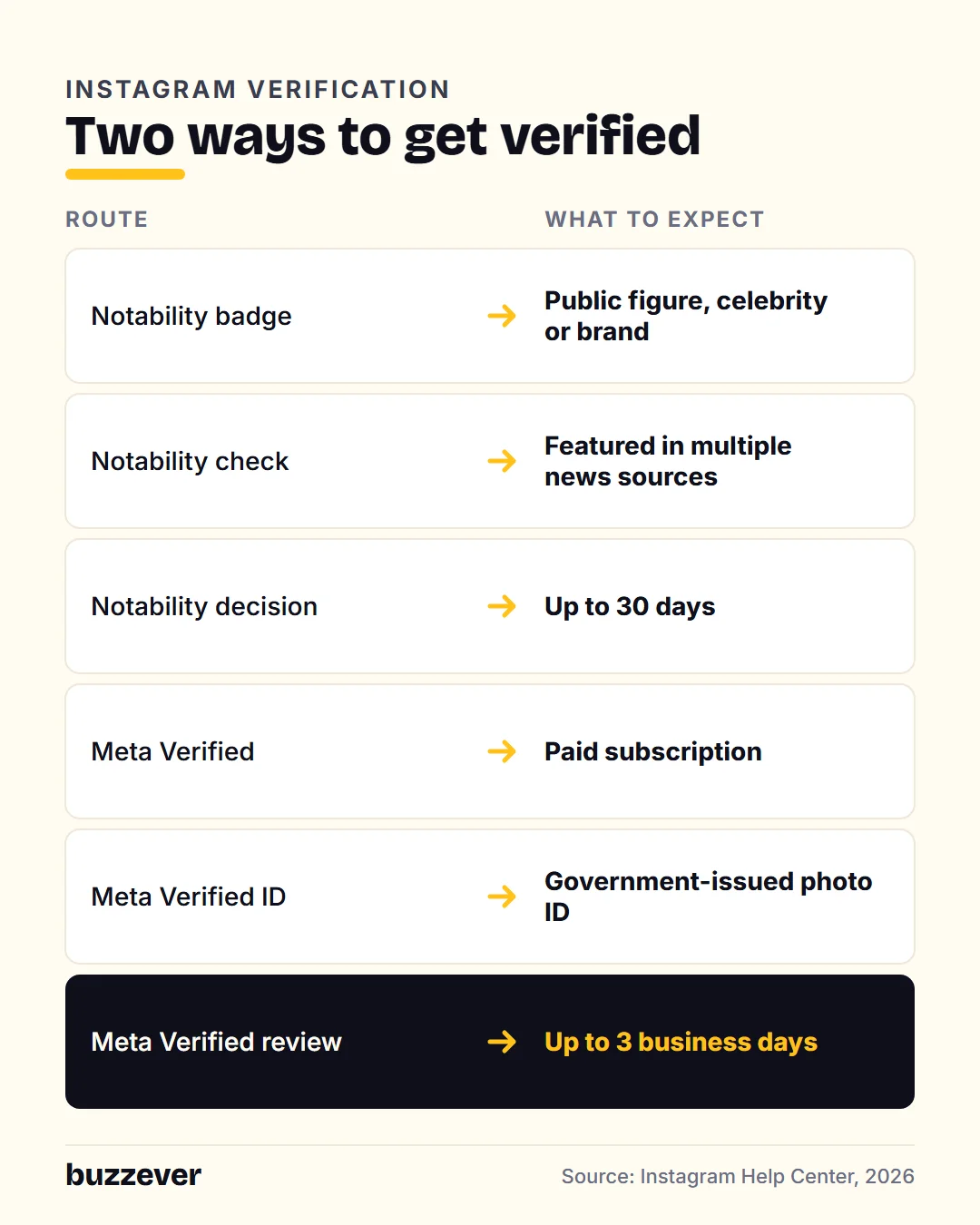
Notability badge vs Meta Verified
| Route | What to expect |
|---|---|
| Notability badge | Public figure, celebrity or brand |
| Notability check | Featured in multiple news sources |
| Notability decision | Up to 30 days |
| Meta Verified | Paid subscription |
| Meta Verified ID | Government-issued photo ID |
| Meta Verified review | Up to 3 business days |
Which one fits you? If journalists already write about you without being paid, try the free route first. If they don't, Meta Verified is the realistic path, and it also brings support and impersonation protection, which matter more than the badge for many creators. Already have a badge from the old notability rules? Instagram says you can still subscribe to Meta Verified.
How to lose the badge
Instagram can remove a badge at any time. Its list of reasons includes advertising, transferring or selling the badge, using your name, bio or photo to promote services that break the rules, trying to get verified through a third party, and switching between public and private too many times. Giving false information during verification can also cost you the badge and the account.
That third-party point is the big one. Anyone who offers to get you verified for a fee is offering something Instagram says can get you penalised. The only official ways in are the two above. If you don't qualify yet, Instagram suggests linking to your Instagram account from your official website and other official profiles so people can tell it's really you.
For more guides on running an account, see Buzzever's Instagram page.
Read next: How to become an influencer: 6 steps, rules included and Instagram bio ideas: a simple formula and 18 patterns to adapt.
Pick the route that matches you
Notable and covered by the press? Apply for free and wait up to 30 days. Not there yet but want the badge and the support? Meta Verified is the official paid option, and the price is in the app. Ignore anyone selling a shortcut.
Questions readers ask
How many followers do you need to get verified on Instagram?
Instagram doesn't publish a follower minimum for the badge. The notability route asks for an account that's authentic, unique, complete and notable, with coverage in multiple news sources.
How much does Meta Verified cost?
Meta Verified is a paid subscription that renews automatically. The price depends on your plan and region and is shown in the app before you pay. Bundling an Instagram and a Facebook profile can lower it.
How long does Instagram verification take?
For the notability badge, Instagram says you'll hear back in Activity up to 30 days after applying. For Meta Verified, review can take up to 3 business days.
Can I reapply if Instagram denies my request?
Yes. You can submit a new request 30 days after a denial. Applying again before you get a decision cancels the application.
Can I change my username after getting verified?
For notability verification, no. Instagram says that once you're verified you may not change your username, and the badge can't be transferred to another account.