How to know if someone blocked you on Instagram
On this page
In short
You can't know for certain, because Instagram doesn't notify people when they're blocked. The best clue is a profile that's missing for you but visible to a friend. Rule out a deactivated account, a new username or a hidden story before deciding.
Key takeaways
- Instagram doesn't notify anyone when they're blocked, and there's no list or tool that shows who blocked you.
- The clearest sign is a profile that's missing for you but still shows up for a friend. Even that is a strong clue, not proof.
- Deactivated accounts, a changed username and a hidden story can all look like a block from the outside.
- Muting and restricting are silent too. If someone used either, you won't see any difference you can check.
If you want to know how to know if someone blocked you on Instagram, here's the honest answer first: you can't know for certain. Instagram says plainly that people aren't notified when you block them, and the app has no screen that lists who blocked you. What you can do is read the signs, rule out the other explanations, and land on "very likely" or "probably not".
That's what this guide does. Each sign below is tied to what Instagram's Help Center says about blocking, checked in October 2026, and each one comes with the innocent explanation that can look the same.
What Instagram says happens when you block someone
Start with the facts, because every sign comes from them. According to Instagram's page on what happens when you block someone:
- The blocked person isn't told.
- Their likes and comments are removed from the blocker's photos and videos. Unblocking doesn't bring them back.
- They can't mention the blocker's username or tag them.
- The old chat stays in the blocker's inbox, but messages the blocked person sends aren't received, and they aren't delivered later even after an unblock.
- In a group chat they share, the blocker can choose to stay, and then both still see each other's messages in that group.
There's also an option to block someone's account plus any other accounts they have or create later. So if you have a second account, it may be blocked as well.
Signs you may have been blocked on Instagram
None of these signs is proof by itself. Two or three together make a block much more likely.
You can't find their profile, but a friend can
This is the sign people notice first. You search for the username and nothing comes up, or you tap their name in an old chat and the profile looks empty. Instagram's Help Center doesn't spell out exactly what a blocked person sees on the profile, so treat this as a clue. The useful test is a comparison. Ask a friend to search the same username. If it shows up for them with posts and a follower count, and not for you, a block is the likely reason.
You can't tag or mention them anymore
Instagram says a blocked person won't be able to mention the blocker's username or tag them. If you type @ and their name never appears in the suggestions, while it used to, that fits a block. It also fits a username change, so check the next sign too.
Your old likes and comments are gone from their posts
Blocking removes the blocked person's likes and comments from the blocker's posts. If a friend can see their posts and tells you your comments have vanished from all of them, that points to a block. One missing comment means much less, since people delete single comments all the time for reasons that have nothing to do with you, like tidying up an old post.
Your messages get no reply, ever
The chat doesn't disappear. Messages you send after a block simply never reach them. On its own this is weak evidence, because plenty of people just stop answering. It only matters when it lines up with the profile test above.
Things that look like a block but aren't
Before you decide, rule these out. Each one is common.
The account was deactivated or deleted. When someone temporarily deactivates their profile, Instagram hides their photos, comments and likes until they log back in. To you, that looks a lot like a block. The difference: if your friend can't find the profile either, the account is probably deactivated or gone, not blocking you.
They changed their username. Search for their real name or check a mutual friend's following list, and if the account turns up under a new name that you can open normally, you weren't blocked at all.
They hid their story from you. Instagram notes that hiding your story from someone is different from blocking them and doesn't stop that person seeing the profile and posts. If the profile and posts open but stories never do, this is the more likely answer.
They muted or restricted you. Instagram won't let people know they were muted. A restricted person can't see when the other person is online or whether messages were read, and their new comments are visible only to themselves unless approved. Both are designed to go unnoticed, so you can't confirm either from your side.
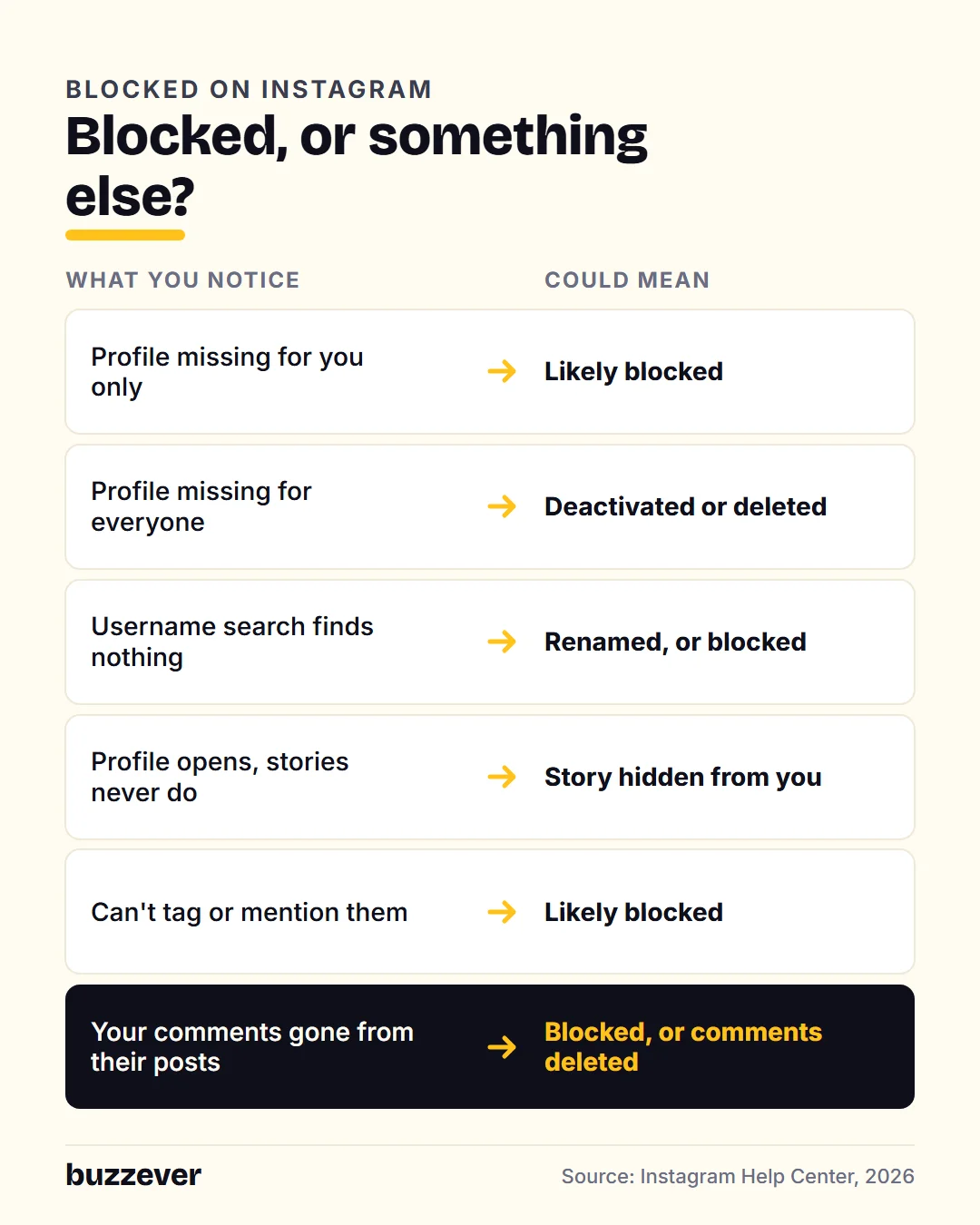
Quick check: blocked, or something else?
| What you notice | Could mean |
|---|---|
| Profile missing for you only | Likely blocked |
| Profile missing for everyone | Deactivated or deleted |
| Username search finds nothing | Renamed, or blocked |
| Profile opens, stories never do | Story hidden from you |
| Can't tag or mention them | Likely blocked |
| Your comments gone from their posts | Blocked, or comments deleted |
What you can't know, and shouldn't try to force
Here's the part most guides skip. There's no official way to confirm a block. You get no notification, and there's no list or setting that reveals it. Apps and websites that promise to tell you who blocked you aren't run by Instagram, and many of them ask for your login, which is a bad trade for a guess.
Making a new account just to check is also a poor idea, because the person may have chosen to block any new accounts you create as well, and it can come across as a way of getting around their decision. If you need to talk to them about something real, like shared plans, work or money, use another channel you already share.
If they did block you, that was a boundary. It's fine to feel annoyed or hurt. It's still better to let it stand.
If you're the one blocking
You can see and undo your own blocks at any time. In the app, go to your profile, open the menu, and under Who can see your content tap Blocked. Instagram's block and unblock guide has the steps for each device. If a full block feels too strong, mute or restrict are quieter options, and neither one tells the other person.
For more practical Instagram guides, visit Buzzever's Instagram page.
Read next: How to hide following on Instagram: what a private account really hides, "This story is unavailable" on Instagram: what it means and how to fix it and Instagram suggested accounts: does Instagram suggest you to people who search for you?.
The short version
A profile that's missing for you but visible to a friend is the best clue you'll get. Everything else is a hint. Rule out deactivation, a new username and a hidden story first, and then let the answer be "probably" instead of chasing certainty Instagram doesn't offer.
Questions readers ask
Does Instagram notify you when someone blocks you?
No. Instagram's Help Center states that people aren't notified when they're blocked, and there's no list of accounts that have blocked you.
If I'm blocked, can I still see their comments anywhere?
Sometimes. Instagram says blocked people can still see the blocker's likes and comments on posts shared by public accounts or by accounts they follow. So spotting their comment under a friend's post doesn't rule out a block.
If I'm blocked, will my old messages disappear?
Instagram says the chat thread stays in the blocker's inbox. New messages from the blocked person aren't received, and they aren't delivered later if the block is lifted.
How can I tell a block from a deactivated account?
Ask a friend to search the username. If they can see the profile and you can't, a block is likely. If nobody can find it, the account was probably deactivated or deleted.
Do block checker apps work?
They aren't made by Instagram and can't see blocking data. Many ask for your login. Skip them and use the friend test instead.