How to hide following on Instagram: what a private account really hides
On this page
In short
No. Instagram has no setting to hide your following list, and your follower and following counts are always public. A private account hides your posts and the private accounts in your lists from non-followers, but Instagram says public accounts you follow can still be seen by anyone. To keep one person out, remove, restrict or block them.
Key takeaways
- Instagram has no setting that hides your following list, and its Help Center lists your follower and following counts as information that is always public.
- Making your account private hides your posts from non-followers, but Instagram's own comparison table says the public accounts you follow can still be seen by anyone.
- To keep one person away, you can remove them as a follower, restrict them, hide your story from them or block them.
- If a tool or app claims it can hide your following list, treat it with suspicion: Instagram doesn't offer that to anyone.
Can you hide who you follow on Instagram? Not in the way most people hope. There's no switch that makes your following list invisible, and the numbers on your profile stay public whatever you do. What you can control is who sees your posts and stories, and how much of your list is visible to people who don't follow you.
This guide uses Instagram's own Help Center pages, checked in October 2026, to show exactly what a private account hides, what it doesn't, and the settings that help when you want to keep one person at a distance.
What is always public on Instagram
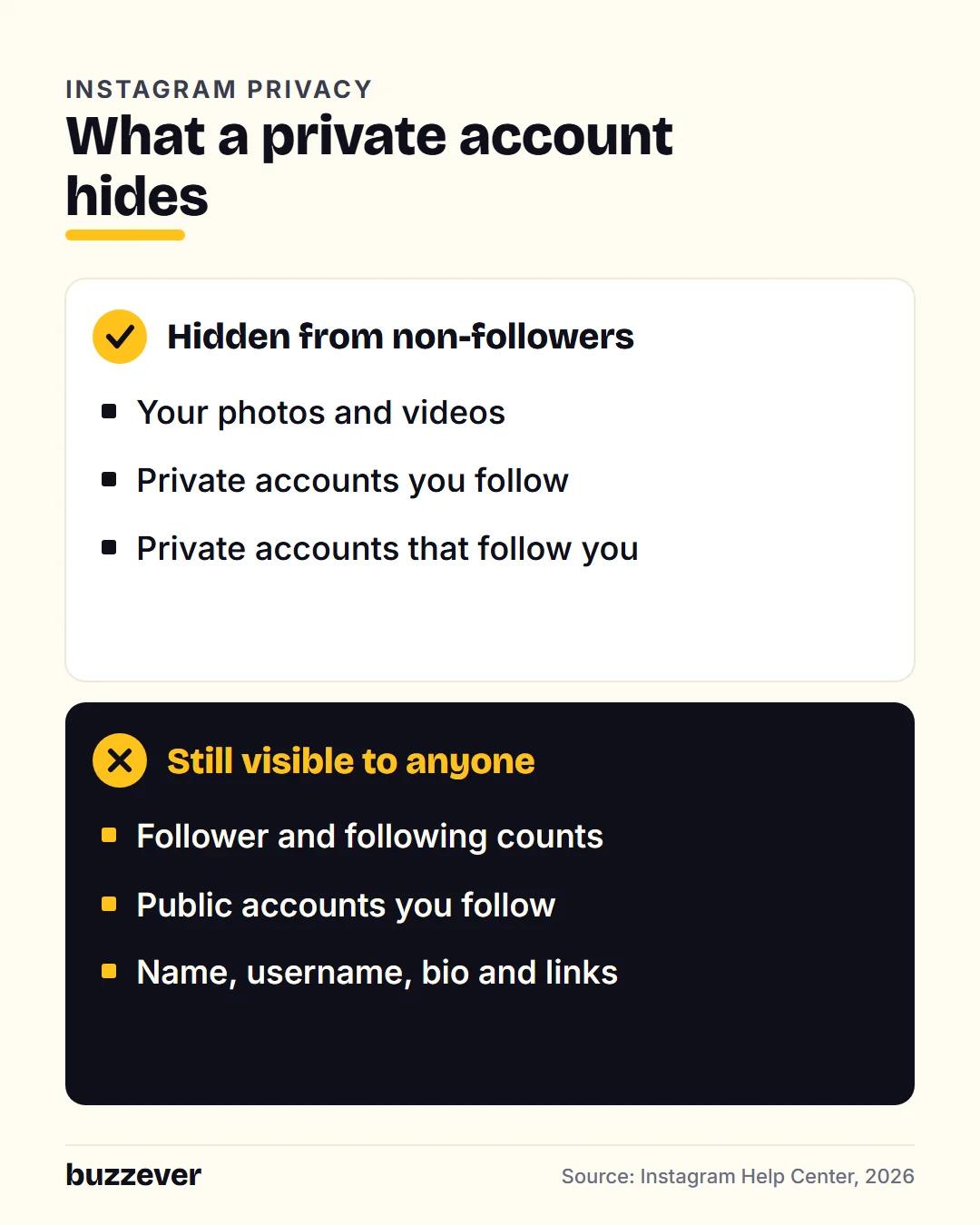
Instagram's Help Center lists the profile information that anyone can see, on or off Instagram, even if they don't have an account: your name, username, profile picture, bio, links, avatar, Threads username, channels you create, and the number of followers and accounts you follow. Instagram says this information can't be hidden and stays public whether your personal account is private or public.
So the counts are never secret. If you follow 312 accounts, everyone can see the number 312.
What a private account hides, and what it doesn't
Instagram publishes a comparison of public and private accounts. The rows that matter for your following list:
| Question | Public account | Private account |
|---|---|---|
| Who can follow you? | Anyone on Instagram | Only people you approve |
| Who can see public accounts you follow and that follow you? | Anyone on Instagram and Threads | Anyone on Instagram and Threads |
| Who can see private accounts you follow and that follow you? | Anyone on Instagram | Your followers |
| Who can see your photos and videos on your profile or in feed? | Anyone on Instagram | Your followers |
| Who can see your profile photo, name, username and bio? | Anyone on or off Instagram | Anyone on or off Instagram |
The second row surprises people. Going private hides your posts and keeps private accounts in your lists between you and your followers, but the public accounts you follow, and public accounts that follow you, can still be seen by anyone, according to Instagram's table. A private account is a real privacy step. It just isn't a way to hide who you follow.
Teen accounts
If you're under 18, your account is private by default. Instagram says teens under 16 need a parent's or guardian's permission to switch to public.
Ways to keep a specific person out
Most people who want to hide their following list really want to keep one or two people from looking. These settings do that more reliably than any workaround.
Remove them as a follower
On a private account, only approved followers see your posts. Remove someone from your followers and they're no longer one of them, and since the account is private, you decide whether to approve them again.
Restrict them
When you restrict someone, they can't see when you're online or whether you've read their messages, and their new comments on your posts are only visible to them unless you approve them. They aren't notified.
Hide your story from them
You can hide your story and live videos from specific people. Instagram points out this is different from blocking: they can still see your profile and posts.
Block them
Blocking is the strongest option. Instagram says people aren't notified when you block them, their likes and comments are removed from your posts, and they can't mention or tag you. You can also block other accounts they may have or create.
What doesn't work
- Apps that promise to hide your list. Instagram doesn't offer this setting, so a third-party app can't switch it on. Some ask for your password, which you should never give to another service.
- A second account. It keeps two sets of follows apart, but each one still has a visible count and its own list.
Check what others see
Want to see your profile the way a stranger does? Look at it while logged out in a browser, or ask a friend who doesn't follow you. Remember the counts are always there, so if the number matters to you, the only way to change it is to follow fewer accounts. You can check any public account's current count with our live follower counter.
Read next: Instagram suggested accounts: does Instagram suggest you to people who search for you? and How to know if someone blocked you on Instagram.
Choose the right setting
If you want fewer eyes on your posts, go private. If it's about one person, remove, restrict, hide your story or block. And if the list itself is the worry, keep in mind that Instagram treats it as public, so follow accordingly. More Instagram guides are on Buzzever's Instagram page.
Questions readers ask
Can you hide your following list on Instagram?
No. Instagram has no setting for it, and its Help Center says the number of followers and accounts you follow is always public. A private account limits who sees private accounts in your lists, but public accounts you follow can still be seen by anyone.
If I make my account private, can people see who I follow?
Partly. According to Instagram's comparison table, private accounts you follow are visible only to your followers, but public accounts you follow can still be seen by anyone on Instagram and Threads.
Can I hide one person I follow?
There's no option to hide a single account from your following list. If you don't want someone to see that you follow a particular account, the only sure way is not to follow it from that profile.
Why can't I see someone's followers list?
Usually because their account is private and you don't follow them, or because you've been blocked. Their follower and following counts stay visible, since Instagram treats those as public profile information.
Does restricting someone hide my followers from them?
No. Restricting limits their comments and messages and hides when you're online or have read their messages. It doesn't change what they can see on your profile.