"This story is unavailable" on Instagram: what it means and how to fix it
On this page
In short
Instagram says a story is unavailable when you can't open it: it expired after 24 hours or was deleted, the account is private, it was shared with Close Friends only, it was hidden from you, or you were blocked. If no stories load at all, the cause is usually your app or connection.
Key takeaways
- "This story is unavailable" means you can't open that story right now. On its own it doesn't prove you've been blocked.
- The most common reason is the simplest: stories disappear after 24 hours, or the owner deleted it.
- Privacy settings come next: a private account you don't follow, a Close Friends story you're not included in, or a story hidden from you.
- If every story fails to load, the problem is more likely your app or connection than anyone's settings.
You tap a profile ring or a shared story and get a grey screen: "This story is unavailable." It's annoying, and the wording doesn't say why. Instagram uses the same message for several situations, some harmless and some deliberate, so the trick is to rule causes out one at a time.
Below are the causes in the order they're most likely, each linked to the Instagram Help Center page that explains the setting behind it, checked in October 2026. Then there's a short list of fixes for when the problem is on your side.
The story expired or was deleted
Instagram says photos and videos shared to a story disappear after 24 hours, unless they're added as a Highlight. If someone sent you their story in a message, or you tapped an old notification, the 24 hours may simply be up. The owner may also have deleted the story early, which has the same result.
How to tell: visit the profile. If there's no coloured ring around the picture, there's no live story. Check the Highlights row under the bio; if the owner saved it there, you can still watch it.
The account is private and you don't follow it
On a private account, only approved followers can see the posts, and stories follow the same rule. This often happens when a friend shares a story from a private account into a chat or onto their own story: they can see it, you can't.
How to tell: open the profile. If it says the account is private and shows a Follow button, send a follow request. If it's approved, the stories will open.
It was shared with Close Friends only
People can share a story with just their Close Friends list. If you're on the list, you'll see a Close Friends label and a green ring. If you're not, that story isn't meant for you, and nobody can ask to be added. Seeing someone's regular stories but not a particular one is a common sign.
The story is hidden from you
Instagram lets anyone hide their story and live videos from specific people in their settings. Hiding is not the same as blocking. Instagram notes that hiding a story doesn't stop that person seeing the profile and posts; they just won't see anything new added to the story.
How to tell: you can view the profile and posts, the account's stories never appear for you, but friends say they can see them. There's no notification either way, and it isn't polite to ask someone to prove it.
You've been blocked, or the account is gone
Blocking goes further than hiding. Instagram suggests blocking for anyone you don't want seeing your posts, and a blocked person can no longer message, mention or tag the account. If you search for the username and the profile doesn't appear, or shows no posts and no follower count, a block or a deleted or deactivated account are both possible. You can't tell which from the outside, and Instagram doesn't notify people when they're blocked.
A fair check: ask a friend to search the same username. If they can see it and you can't, a block is the likely reason. If nobody can, the account was probably deleted or deactivated.
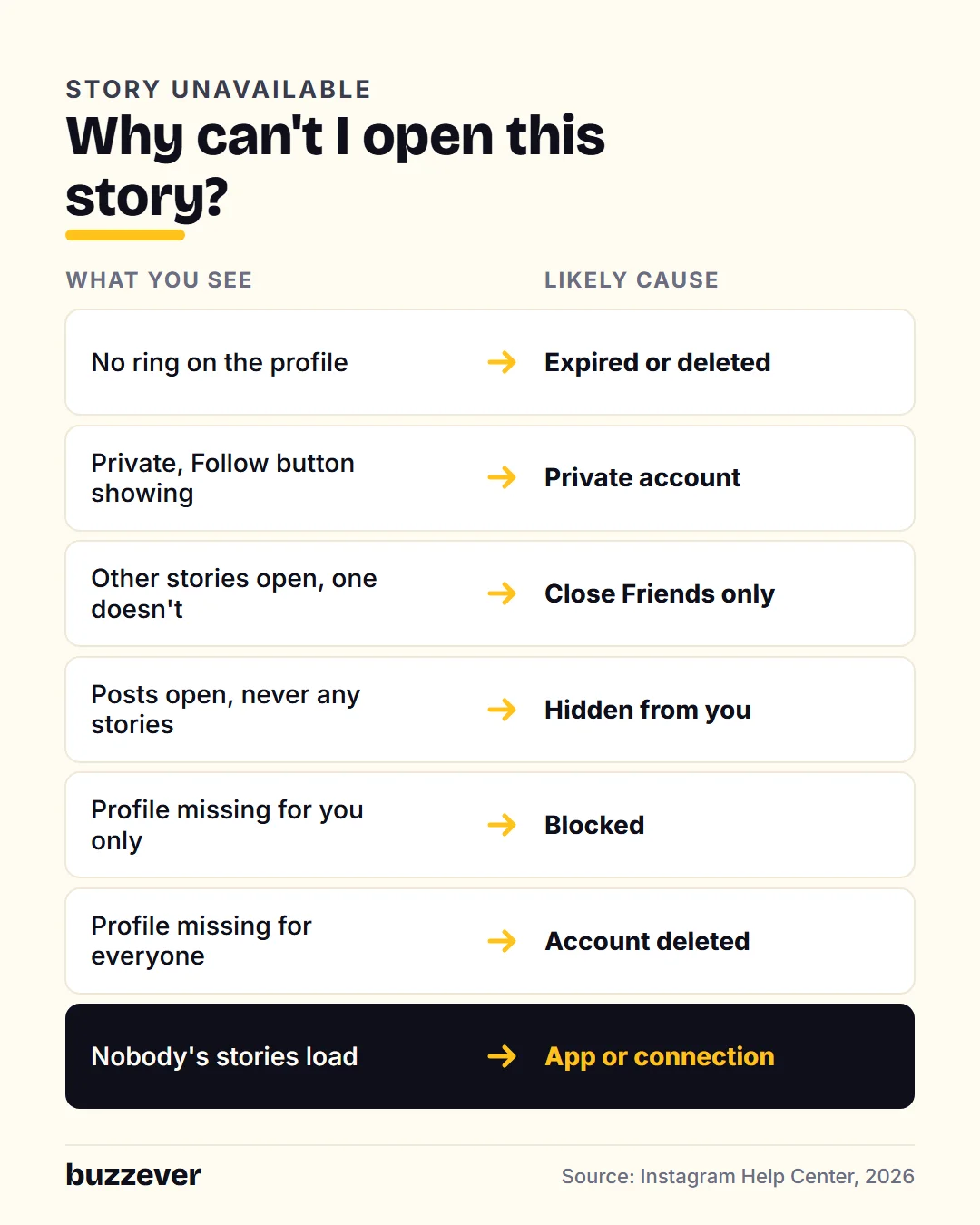
Quick table: which cause is it?
| What you see | Most likely cause |
|---|---|
| No ring on the profile picture | The story expired or was deleted |
| Profile says private, Follow button showing | Private account you don't follow |
| Other stories open, one doesn't | Close Friends story |
| Profile and posts open, never any stories | Story hidden from you |
| Profile missing for you, visible to friends | You've been blocked |
| Profile missing for everyone | Account deleted or deactivated |
| Nobody's stories load | App or connection problem |
Fixes when the problem is on your side
If every story you open fails, or stories work on another phone but not yours, try these in order:
- Check your connection. Switch between Wi-Fi and mobile data. Stories are video, so a weak signal can fail where text loads fine.
- Update the app. Old versions can break newer story features.
- Close and reopen Instagram. Fully close it, not just switch apps.
- Clear the app's cache on Android, or offload and reinstall on iPhone. You'll need to log in again, so make sure you know your password first.
- Try another device or instagram.com. If it works there, the problem is your phone, not the account.
- Report the problem to Instagram through the Help section of the app's settings if nothing works for a day or more.
If you're the one posting
Followers telling you your story is unavailable? Check three settings. Your story may be set to Close Friends from a previous post. You may have hidden your story from them without meaning to, under Hide story and live from. Or your account may be private and they haven't been approved. If you want stories to last, add them to a Highlight so they stay on your profile after 24 hours.
Want to know if people actually watch your stories? Buzzever's Instagram page has more guides, and the free engagement rate calculator helps you read the numbers.
Read next: 30 Instagram story ideas, sorted by what you want them to do and How to know if someone blocked you on Instagram.
Start with the simple answer
Most of the time the story has just expired, been deleted or been shared with a smaller group. Check the profile ring and the Highlights first, then the privacy settings, and only then worry about a block.
Questions readers ask
Does "story unavailable" mean I'm blocked?
Not necessarily. The same message appears when a story has expired or been deleted, when the account is private, when the story is for Close Friends only, or when it's hidden from you. A block is only likely if the profile is missing for you but visible to others.
How do I know if someone hid their Instagram story from me?
Instagram doesn't tell you. A common sign is that you can see the person's profile and posts but never any stories, while mutual friends can. Instagram notes that hiding your story is different from blocking and doesn't stop someone seeing your profile and posts.
Why can I see someone's story but not one particular story?
That story was most likely shared with their Close Friends list, or it has expired or been deleted. People on the Close Friends list see a green ring and a Close Friends label.
How long does an Instagram story stay up?
24 hours. After that it disappears from the profile, feed and messages, unless the owner adds it to a Highlight, where it stays until they remove it.
Why does every story say unavailable?
If all stories fail, the cause is usually on your side: a weak connection, an outdated app or a cache problem. Update the app, restart it and try another network or device.